MD Mac CD RIP Pro
The application combines optical-drive setup, release metadata, secure Test & Copy workflows and organized output in one native macOS workspace.
A reviewable Test & Copy sequence
Detect the drive
Insert an audio CD, select the exact drive profile and read the TOC.
Review metadata
Compare candidate releases, catalogue data, track order and artwork before applying.
Choose output
Select WAV, FLAC or MP3, track or image layout, CUE/M3U and destination.
Test & Copy
Run secure reading, compare Test and Copy CRC, then review logs and final files.
The final result depends on the optical drive, disc condition, network access to metadata services and the selected output settings.
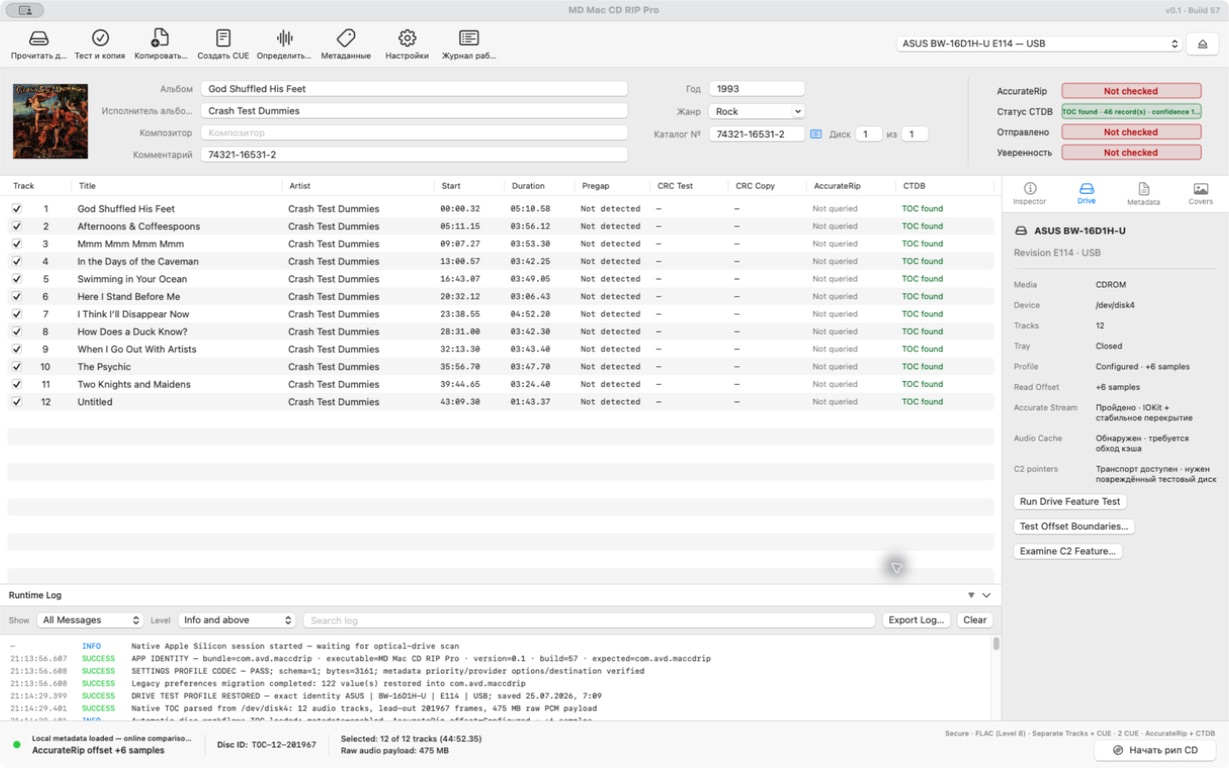
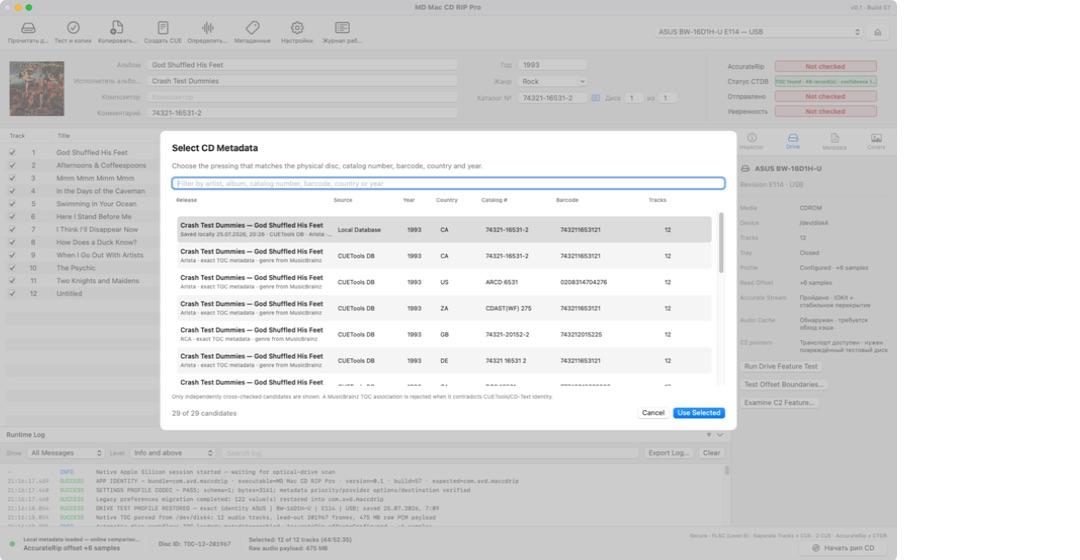
Main window and metadata selection
Treat every drive as a measured device
The implementation stores a profile by vendor, product, revision and interface. Confirm the selected drive before relying on offset, cache or C2 settings. Available diagnostics include TOC consistency, Accurate Stream, cache detection/cache-defeat, offset-boundary tests, native C2 transport probing and subchannel Q reading for Method B.
- A transport probe does not prove reliable C2 correction on damaged media.
- Offset correction may fill unavailable samples with silence; keep this visible in logs.
- Use secure reread/consensus with bounded retries rather than endless retries.
Resolve the exact release before extraction
Confirmed provider workflows include the local database first, CUETools DB, MusicBrainz, Discogs and CD-Text with configurable priority and provider settings. Compare catalogue number, barcode, medium, track count, durations and visible edition information. Never choose a release solely from artist/title similarity.
Artwork can be normalized to sRGB JPEG with a maximum of 1500 × 1500 and 3 MB. Keep the original artwork separately. A normalized cover is a delivery asset, not the archival master.
Separate repeatability from external verification
Test CRC and Copy CRC can demonstrate repeatability between reads. Local AccurateRip CRC v1/v2 calculation is implemented, but official AccurateRip online lookup and confidence are not implemented or verified. CTDB TOC lookup is implemented, but whole-disc CTDB PCM verification/correction is not.
A message such as TOC found must never be presented as proof that audio PCM matches AccurateRip or CTDB. Preserve the extraction log, runtime log, CUE and checksums with the audio files so the process remains auditable.
Audio plus the evidence needed to understand it
- WAV: uncompressed PCM.
- FLAC: levels 1–8 with required test/decode and decoded-PCM comparison.
- MP3: LAME VBR, CBR or ABR with decoded-duration verification.
- Layouts: separate tracks + CUE or image + CUE.
- Companions: Original/Playback CUE, M3U and two extraction-log styles.
Publishing uses a .part-to-final sequence and must not silently overwrite existing files. AIFF, ALAC, APE and other codecs are not public features until implemented and verified.
Preserve evidence before changing settings
The drive or disc is not detected
Confirm power, cable and macOS visibility, then re-read the TOC. Do not change offsets or C2 settings merely to make a drive appear.
Test and Copy CRC differ
Keep the logs, inspect reread evidence, clean the disc without damaging it and retry with the same measured drive profile. A matching second read is evidence of repeatability, not automatically an external database match.
A metadata result is wrong
Compare catalogue/barcode, medium, track count and timings, then choose another candidate or enter data manually. Keep a local corrected record if appropriate.